

AssureID Sentinel SDK
Overview
Section titled “Overview”This document provides a detailed reference guide for the AssureID Sentinel Software Developer’s Kit (SDK). It is intended for developers who want to integrate the AssureID product line into their own applications or develop custom AssureID applications.
System Requirements
Section titled “System Requirements”The AssureID Sentinel SDK has the following system requirements:
| Operating system | |
|---|---|
| Microsoft Windows 11| 10 | 8.1 | 8 (64-bit) | |
| CPU | |
| Intel Core 2 Duo (recommended) 2GHz Intel Pentium 4 CPU (minimum) | |
| 2GB (recommended) 1GB RAM (minimum) | |
| 10 GB hard disk space available | |
| Software | |
| Microsoft .NET Framework V4.8 * |
*Automatically installed (if required) during AssureID installation
AssureID Sentinel SDK Installation
Section titled “AssureID Sentinel SDK Installation”The AssureID Sentinel SDK is installed as part of the AssureID Sentinel Developer’s SDK software installation process when an AssureID Developer Key is specified during installation. All necessary software components required for application development and runtime are available in any valid AssureID Developer installation. No additional installation or configuration steps are necessary for the SDK. If you are unsure what type of installation key you have, contact Technical Support. If you need to purchase a developer key, contact your sales representative.
Technical Support
Section titled “Technical Support”Contact Technical Support using one of the following methods:
Web: https://gbgamericas.my.site.com/support
Phone: 866-520-1234
Normal support hours are 8:00 AM EST – 8:00 PM PST, Monday through Friday.
AssureID Document Authentication Platform
Section titled “AssureID Document Authentication Platform”The AssureID Document Authentication Platform (DAP) is installed and runs as a Windows service under Microsoft Windows 8|8.1|10|11. This service interacts with the i-Dentify Document Reader/Authenticator hardware and is responsible for the actual document capture, identification, reading, and authentication functionality.
AssureID Sentinel SDK
Section titled “AssureID Sentinel SDK”One or more client applications can simultaneously communicate with the DAP service via the AssureID SDK. These AssureID client applications can be applications developed by GBG, customer-developed applications using the AssureID Sentinel SDK, or a combination of both. It is important to note that only one application should assume the role of controlling the DAP at any one time (such as starting or stopping the service or changing the document trigger or transaction modes) to prevent apparently unusual behavior from occurring in the other applications. Any changes to the behavior of the AssureID DAP service will be visible to all connected applications.
Three versions of the AssureID Sentinel SDK are available and provide the same functionality:
- A Microsoft .NET-based component library
- A Microsoft COM-based component library (32- and 64-bit)
- A Java-based component library
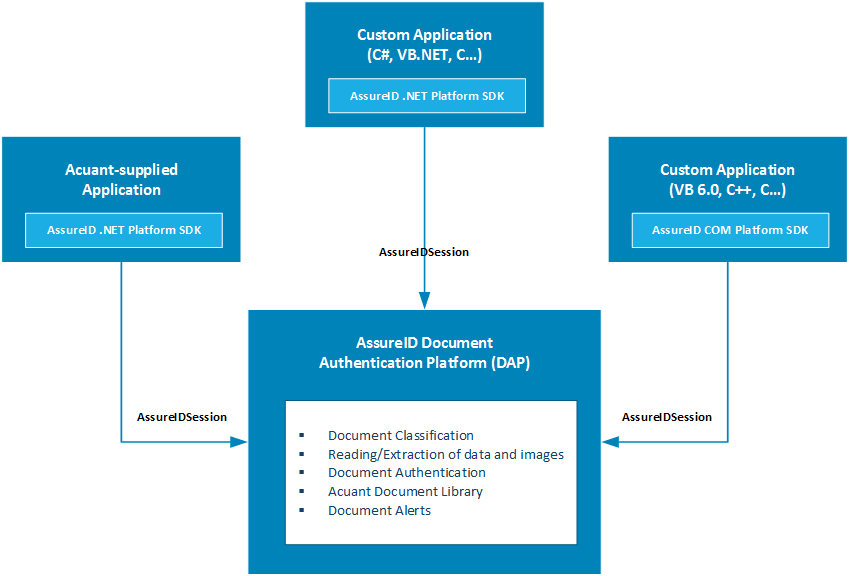
The primary interface to the DAP from the SDK is through the AssureIDSession component. This component allows a client application to establish a session with the AssureID DAP, control the DAP, receive asynchronous event notifications, and access extracted document information. Applications can establish a session with the AssureID DAP when the service is running. SDK clients automatically connect to the DAP when the DAP service starts. The following figure describes the architecture of the AssureID DAP, the SDK, and the client applications.
The AssureID Sentinel SDK implements a transaction-document model that provides a complete description of all data extracted from the identification document. This model contains the following elements:
- **Transaction - ** An outer container for one or more captured documents. The AssureID SDK supports capturing multiple documents per transaction and allowing them to be associated within a single transaction.
- **Document - ** A single captured page from a single identification document, including all extracted information. The document includes information about the identification document (size, type, etc.) as well as all captured document images, extracted document regions, text fields, and authentication alerts.
- **Document Image - ** A single image of an identification document captured under a specific lighting condition. Documents generally contain multiple document images, each captured with different lighting conditions.
- **Document Region - ** An extracted region of the identification document such as the photo or Machine- Readable Zone (MRZ). It contains the raw, unprocessed text (if appropriate), related data, and the image clip of the region. Documents typically have many regions.
- **Document Field - ** A processed extracted value from the identification document. Applications should use text from document fields instead of regions because fields are the fully processed and correlated values. Additionally, fields can provide more accurate results because they can be generated from multiple source regions (such as the name being extracted from the Visual Inspection Zone (VSZ) and the Machine-Readable Zone (MRZ) of a document). Documents generally have a standard set of fields (described in the AssureID SDK Reference documentation), with values populated depending on the type of document captured.
- **Document Alert - ** A potential problem that occurred while processing and authenticating the document. Documents may have zero or more alerts associated with them.
Note: A document’s risk level is defined by the Application domain. For example, an expired document generates an Alert, but the Custom Application determines whether this Alert represents a security risk that might warrant attention.