

The sample React client
Installing the AssureID Sentinel REST API Client
Section titled “Installing the AssureID Sentinel REST API Client”Installing the AssureID Sentinel REST API client is optional. You can use Swagger to experience the REST API, or install the AssureID REST API client as a sample application that uses the AssureID REST API.
Note: You must have the current version of AssureID Sentinel already installed before you install the client. Building the sample also requires Node.js 24.x or newer and npm 11.x or newer, and a running AssureID Sentinel REST API service that is reachable from the machine where you build it.
Install the client application
-
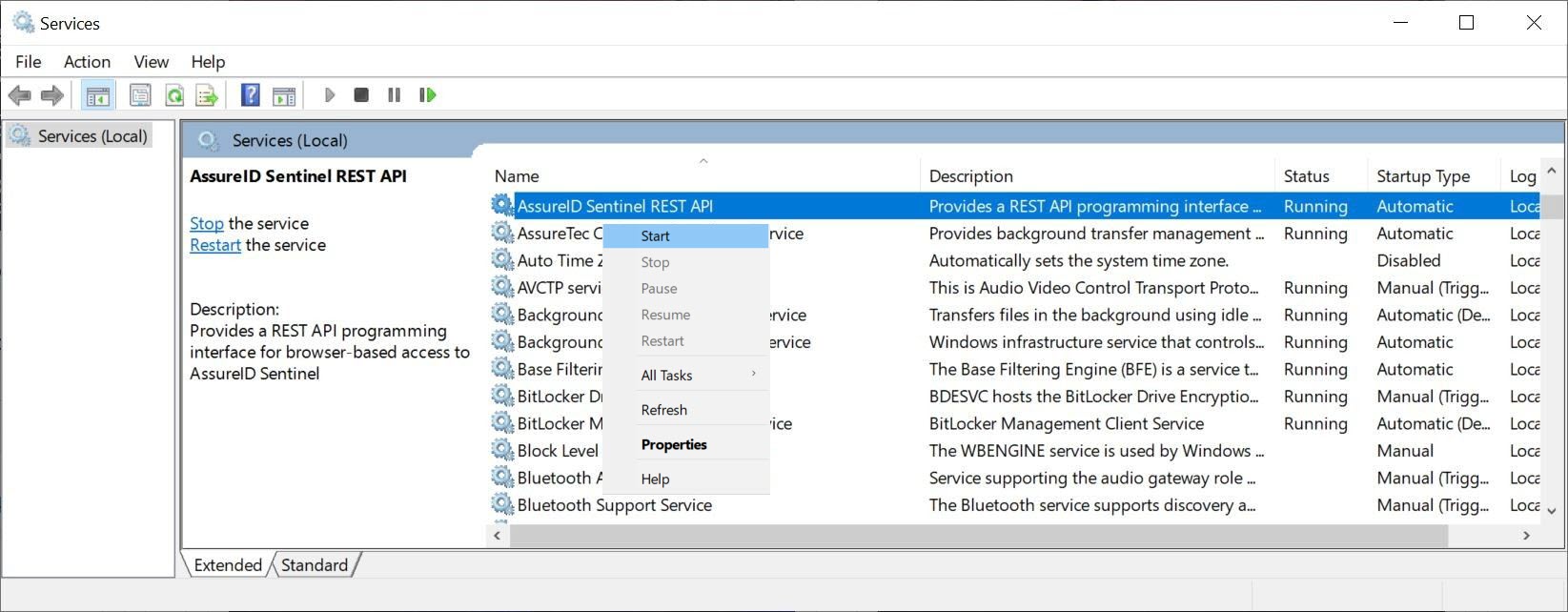
Start the Windows Services application.
-
Right click AssureID Sentinel REST API, and select Start from the menu to start the service:
-
Create a new folder:
c:\client. -
Download and install Node.js 24.x or later from https://nodejs.org/en/download/.
-
Copy the sentinel-react-client folder from the AssureID Sentinel installation (for example, c:\Program Files\Acuant\AssureID\sdk\samples\sentinel-react-client) into the c:\client folder.
-
Open a CMD window.
-
Change to the c:\client\sentinel-react-client folder.
-
Run the following command to install the sample’s dependencies:
npm install
-
-
Optional: to point the sample at a SentinelWebService instance on a different host or port, copy the .env.example file to .env.local and edit the values documented in it.
-
Run the
npm startcommand to open the client application in your default browser: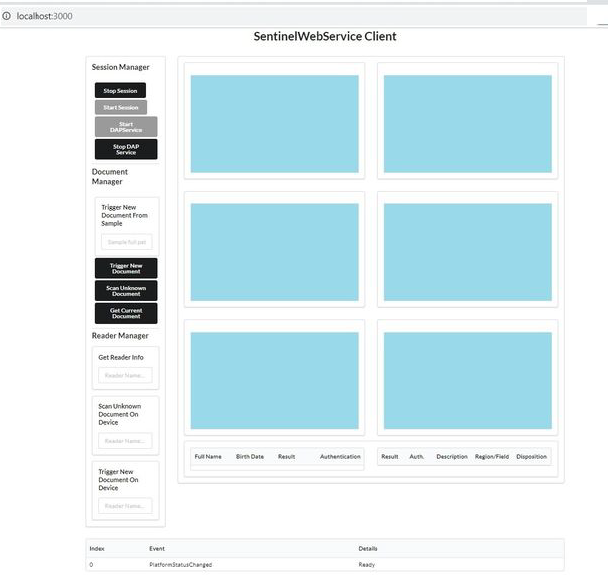
Sample client commands
Section titled “Sample client commands”The client is delivered as source and is built and run by you; there is no prebuilt binary. It demonstrates one working integration and does not constrain how your own application is built. Run the following commands from the sentinel-react-client folder:
- npm install - install the sample’s dependencies.
- npm run dev - start the development server on http://localhost:3000.
- npm start - alias for npm run dev.
- npm run build - produce a production bundle in the dist folder.
- npm run preview - preview the production bundle on http://localhost:3000.
- npm test - run the sample’s test suite.
Configuring the backend endpoints
Section titled “Configuring the backend endpoints”The sample communicates with the AssureID Sentinel REST API service over two endpoints: a REST base URL for session, document, and reader operations, and a WebSocket URL for platform and document events. Both default to the local machine, so the sample runs without any configuration.
To point the sample at a different host or port, copy the .env.example file to .env.local and edit the values there. The .env.example file is the source of truth for the variable names, formats, and defaults:
- VITE_SENTINEL_REST_URL - base URL of the REST API. Format: http(s)://
<host>:<port>/sentinel/v1/session. Default: http://localhost:10300/sentinel/v1/session - VITE_SENTINEL_WS_URL - WebSocket endpoint that the service pushes platform and document events on. Format: ws(s)://
<host>:<port>. Default: ws://localhost:10301
Note: Only variables prefixed with VITE_ are exposed to the client application, and they are embedded into the bundle when it is built rather than read when it runs. After changing a value, re-run npm run build, or restart the development server, for the change to take effect.
Styling and offline environments
Section titled “Styling and offline environments”The sample loads its user interface stylesheet (Semantic UI) from a public content delivery network, cdnjs.cloudflare.com, at runtime.
Note: The sample renders without styling if the machine has no internet access. In an offline, air-gapped, or firewall-restricted environment, add Semantic UI (or the maintained Fomantic-UI fork) to the project instead of loading it from the content delivery network.
Migrating from an earlier version of the sample client
Section titled “Migrating from an earlier version of the sample client”If you previously built this sample with Create React App (react-scripts), note the following changes:
- Node.js 24 is required. The previous version of the sample used Node.js 16.
- The build tool is now Vite rather than Create React App: react-scripts start becomes vite (npm start or npm run dev), react-scripts build becomes vite build (npm run build), and react-scripts test becomes vitest (npm test).
- Environment variables use the VITE_ prefix rather than REACT_APP_, and are embedded when the bundle is built rather than read when it runs.
- React 19 is used. The sample’s entry point now calls ReactDOM.createRoot in place of the removed ReactDOM.render.
- The unused react-json-view, immutable, react-window, es6-enum, and web-vitals dependencies were removed. If your copy of the sample uses any of them, reinstall them with npm install.
None of these changes affect how the sample communicates with AssureID Sentinel. The REST and WebSocket integration contract is unchanged, so an integration built against an earlier version of the sample does not need to change.