

Operations
The AssureID Sentinel REST API supports only one REST API client at a time. In order to start working with the AssureID Sentinel REST API, the user needs to start a session with a unique GUID that is provided by the client. The AssureID Sentinel REST API keeps that GUID, and after the session is successfully initialized, all the requests that the AssureID Sentinel REST API receives, should be sent with the same GUID, until the user sends a DELETE request that closes the session. The GUID serves as a session identifier for the AssureID Sentinel REST API, and it should not be changed, unless the user deletes the current session and starts a new one.
The AssureID Sentinel REST API serves as a proxy between the browser and the DAP Service. Each request that arrives to the AssureID Sentinel REST API is forwarded to the DAP Service. The AssureID Sentinel REST API converts the events that the DAP Service sends to a JSON object and sends them as a message on the WebSocket.
The DAP Service sends the PlatformStatusChanged event whenever its operation status is updated**,** therefore the user should only send new requests after it receives the PlatformStatusChanged event with a new status of Ready. GBG recommends closing the WebSocket before the page is closed.
Note: GBG recommends setting the AssureID Sentinel REST API service startup type to Automatic in the Services application.
StartSession
Section titled “StartSession”The StartSession operation is performed when the user sends the POST Sentinel/v1/ Session/{GUID} request. In this operation, the AssureID Sentinel REST API creates a new session with the DAP Service by registering the session in the DAP Service. The operation is performed unless one of the following occurs:
- The request arrives from a distant host.
- There is an active session (a session that was not deleted)
- There is a problem with the server.
The client is responsible for the following:
- Provide a unique GUID for the Start operation.
- Keep the Start operation GUID, so that it will be added for the rest of the operations.
- Initiate the WebSocket.
GBG recommends that every refresh operation on the browser will start a new session, with a newly created GUID. In addition, GBG recommends that the WebSocket will be created after the Start operation has succeeded.
StopSession
Section titled “StopSession”The StopSession operation is performed when the user sends the DELETE Sentinel/v1/ session/{GUID} request. In this operation, the AssureID Sentinel REST API deletes the current session, and unregisters the connection with the DAP Service unless one of the following occurs:
- The request arrives from a distant host.
- There is no session for the requested GUID.
- There is a problem with the server.
- The server is currently busy handling other requests.
If the server is busy handling other requests, GBG recommends that the user send the request again after a while.
GetReaderInfo
Section titled “GetReaderInfo”The GetReaderInfo operation is performed when the user sends the GET Sentinel/ v1/Session/{GUID}/Readers?readerName=<reader-name>. In this operation, the AssureID Sentinel REST API sends the required reader information as a JSON object in the response body, unless one of the following occurs:
- The request arrives from a distant host.
- There is no session for the requested GUID.
- There is a problem with the server.
- The server is currently busy handling other requests.
If the server is busy handling other requests, wait a while and send the request again.
ScanUnknownDocument
Section titled “ScanUnknownDocument”The ScanUnknownDocument operation is performed when the user sends the POST Sentinel/v1/Session/{GUID}/Document/Trigger?unknown=true request. In this operation, the AssureID Sentinel REST API asks the DAP Service to scan the document without performing any classification. The AssureID Sentinel REST API responds immediately after sending the request to the DAP Service, but the actual response is a stream of messages that are sent on the WebSocket until the DAP Service sends the PlatformStatusChanged event with a new status of Ready.
The AssureID Sentinel REST API responds with an error if one of the following occurs:
- The request arrives from a distant host.
- There is no session for the requested GUID.
- There is a problem with the server.
- The server is currently busy handling other requests.
If the server is busy handling other requests, wait a while and send the request again.
ScanUnknownDocumentOnDevice
Section titled “ScanUnknownDocumentOnDevice”The ScanUnknownDocumentOnDevice operation is performed when the user sends the POST Sentinel/v1/Session/{GUID}/Readers/Trigger?unknown=true&&readerName=<reader-name> request. In this operation, the AssureID Sentinel REST API asks the DAP Service to scan the document on the required reader without doing any classification. This is the same operation as ScanUnknownDocument, except that the ScanUnknownDocumentOnDevice operation is performed on the required reader. The AssureID Sentinel REST API responds immediately after sending the request to the DAP Service, but the actual response is a stream of messages that are sent on the WebSocket until the DAP Service sends the PlatformStatusChanged event with a new status of Ready.
The AssureID Sentinel REST API responds with an error if any of the following occurs:
- The request arrives from a distant host.
- There is no session for the requested GUID.
- There is a problem with the server.
- The server is currently busy handling other requests.
If the server is busy handling other requests, GBG recommends that the user send the request again after a while.
StartService
Section titled “StartService”The StartService operation is performed when the user sends the POST Sentinel/v1/ session/{GUID}/StartService request. In this operation, the AssureID Sentinel REST API requests the DAP Service to start. The AssureID Sentinel REST API does not keep the DAP Service operational state, and the StartService command is sent to the DAP Service, regardless of the current DAP Service state.
The AssureID Sentinel REST API responds with an error if one of the following occurs:
- The request arrives from a distant host.
- There is no session for the requested GUID.
- The server is currently busy handling other requests.
If the server is busy handling other requests, wait a while and send the request again.
StopService
Section titled “StopService”The StopService operation is performed when the user sends the POST Sentinel/v1/ session/{GUID}/StopService request. In this operation, the AssureID Sentinel REST API requests the DAP Service to stop. The AssureID Sentinel REST API does not keep the DAP Service operational state, and the StopService command is sent to the DAP Service, regardless of the current DAP Service state.
The AssureID Sentinel REST API responds with an error if one of the following occurs:
- The request arrives from a distant host.
- There is no session for the requested GUID.
- The server is currently busy handling other requests.
If the server is busy handling other requests, wait a while and send the request again.
TriggerNewDocument
Section titled “TriggerNewDocument”The TriggerNewDocument operation is performed when the user sends the POST Sentinel/v1/session/{GUID}/Document/Trigger?unknown=false request. In this operation, the AssureID Sentinel REST API send the TriggerNewDocument command to the DAP Service, which scans and classifies the document on the current reader.
The AssureID Sentinel REST API sends the HTTP response immediately, and then receives a stream of messages from the DAP Service. Each message is converted to a JSON object and sent on the WebSocket. If there is no current document defined in the DAP Service, or If there no reader, The AssureID Sentinel REST API does not receive any messages, and therefore it does not send any message to the browser. The request is fully processed after the browser receives the PlatformStatusChanged event with a new status of Ready. A detailed description of this process is shown in the TriggerNewDocument Sequence Diagram.
The AssureID Sentinel REST API responds with an error If one of the following occurs:
- The request arrives from a distant host.
- There is no session for the requested GUID.
- There is a problem with the server.
- The server is currently busy handling other requests.
If the server is busy handling other requests, wait a while and send the request again.
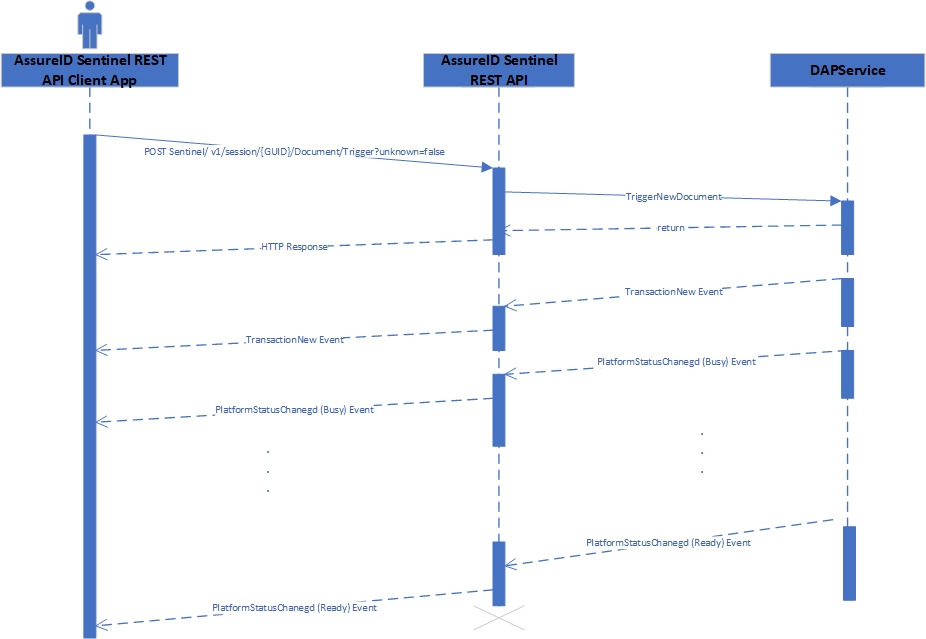
TriggerNewDocument Sequence Diagram
TriggerNewDocumentFromSample
Section titled “TriggerNewDocumentFromSample”The TriggerNewDocumentFromSample operation is performed when the user sends POST Sentinel/v1/session/{GUID}/Document/Trigger? unknown=false&filename= <file_name> request. In this operation, the AssureID Sentinel REST API send the TriggerNewDocumentFromSample command to the DAP Service, which loads and processes the sample file.
The AssureID Sentinel REST API sends the HTTP response immediately, and then receives a stream of messages from the DAP Service. Each message is converted to a JSON object and sent on the WebSocket. If of an error, The AssureID Sentinel REST API does not receive any messages, and therefore it does not send any message to the browser. The request is fully processed after the browser receives the PlatformStatusChanged event with a new status of Ready. A similar process is shown in the TriggerNewDocument Sequence Diagram.
The AssureID Sentinel REST API responds with an error If one of the following occurs:
- The request arrives from a distant host.
- There is no session for the requested GUID.
- There is a problem with the server.
- The server is currently busy handling other requests.
If the server is busy handling other requests, wait a while and send the request again.
TriggerNewDocumentOnDevice
Section titled “TriggerNewDocumentOnDevice”The TriggerNewDocumentOnDevice operation is performed when the user sends the POST Sentinel/v1/session/{GUID}/Readers/Trigger?unknown=false&& readerName=<reader-name> request. In this operation, the AssureID Sentinel REST API sends the TriggerNewDocumentOnDevice command to the DAP Service, which processes the current document on the required reader.
The AssureID Sentinel REST API sends the HTTP response immediately, and then receives a stream of messages from the DAP Service. Each message is converted to a JSON object and sent on the WebSocket. If of an error, The AssureID Sentinel REST API does not receive any messages, and therefore it does not send any message to the browser. The request is fully processed after the browser receives the PlatformStatusChanged event with a new status of Ready. A similar process is shown in the TriggerNewDocument Sequence Diagram.
The AssureID Sentinel REST API responds with an error If one of the following occurs:
- The request arrives from a distant host.
- There is no session for the requested GUID.
- There is a problem with the server.
- The server is currently busy handling other requests.
If the server is busy handling other requests, wait a while and send the request again.
CurrentDocument
Section titled “CurrentDocument”The CurrentDocument operation is performed when the user sends a GET Sentinel/v1/ session/{GUID}/Document request. In this operation, the AssureID Sentinel REST API sends the CurrentDocument command to the DAP Service, which returns current document.
If the DAP Service responds with a Document, the AssureID Sentinel REST API builds a JSON object from the Document, and returns it in the response body, otherwise, it sends the response status with an empty body.
The AssureID Sentinel REST API responds with an error If one of the following occurs:
- The request arrives from a distant host.
- There is no session for the requested GUID.
- There is a problem with the server.
- The server is currently busy handling other requests.
If the server is busy handling other requests, GBG recommends that the user send the request again after a while.
Get OrientationCorrection
Section titled “Get OrientationCorrection”The Get OrientationCorrection operation is performed when the user sends a GET Sentinel/v1/ session/{GUID}/settings/orientation-correction request. In this operation, the AssureID Sentinel REST API retrieves the DAP Service OrientationCorrection property value. The AssureID Sentinel REST API builds a JSON object in the following format and returns it in the response body:
{"OrientationCorrection":<orientation-correction-value>}The AssureID Sentinel REST API responds with an error If one of the following occurs:
- The request arrives from a distant host.
- There is no session for the requested GUID.
- There is a problem with the server.
- The server is currently busy handling other requests.
If the server is busy handling other requests, wait a while and send the request again.
Set OrientationCorrection
Section titled “Set OrientationCorrection”The Set OrientationCorrection operation is performed when the user sends a PUT Sentinel/v1/ session/{GUID}/settings/orientation-correction/{orientationCorrection} request. In this operation, the AssureID Sentinel REST API sets the DAP Service OrientationCorrection property value to {orientationCorrection}.
The AssureID Sentinel REST API responds with an error If one of the following occurs:
- The request arrives from a distant host.
- There is no session for the requested GUID.
- There is a problem with the server.
- The server is currently busy handling other requests.
If the server is busy handling other requests, wait a while and send the request again.
Get PresentationCorrection
Section titled “Get PresentationCorrection”The Get PresentationCorrection operation is performed when the user sends a GET Sentinel/v1/ session/{GUID}/settings/presentation-correction request. In this operation, the AssureID Sentinel REST API retrieves the DAP Service PresentationCorrection property value. The AssureID Sentinel REST API builds a JSON object in the following format and returns it in the response body:
{"PresentationCorrection": <presentation-correction-value>}The AssureID Sentinel REST API responds with an error If one of the following occurs:
- The request arrives from a distant host.
- There is no session for the requested GUID.
- There is a problem with the server.
- The server is currently busy handling other requests.
If the server is busy handling other requests, wait a while and send the request again.
Set PresentationCorrection
Section titled “Set PresentationCorrection”The Set PresentationCorrection operation is performed when the user sends a PUT Sentinel/v1/ session/{GUID}/settings/presentation-correction/{presentationCorrection} request. In this operation the AssureID Sentinel REST API sets the DAP Service PresentationCorrection property value.
The AssureID Sentinel REST API responds with an error If one of the following occurs:
- The request arrives from a distant host.
- There is no session for the requested GUID.
- There is a problem with the server.
- The server is currently busy handling other requests.
If the server is busy handling other requests, wait a while and send the request again.