

ScanW library
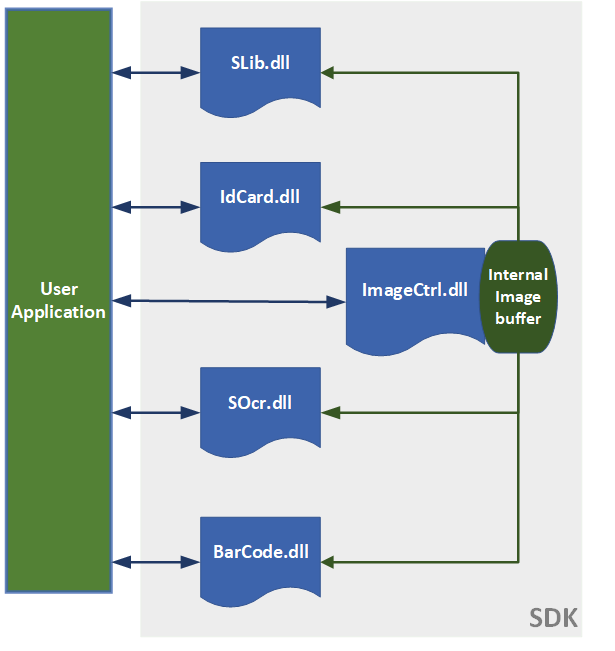
The ScanW.dll library is a wrapper COM object. This library contains:
-
SLib.dll – Controls the scanner activity and contains the last scanned image in an internal memory. This library controls the scanning settings such as scan size, color scheme and resolution. The scanned image is loaded to an internal memory and can be saved to an external file in bitmap format.
-
IdCard.dll (in the ID version only) – Parses and refines the textual data extracted by the OCR. The data is kept in internal variables ready to be exported to the application.
-
ImageCtrl.dll – Used for internal image manipulation such as rotation, color scheme modification, dpi modification and image export to a file in various formats. This library can also be used for external image file manipulation.
-
SOcr.dll (in the OCR version only) – Extracts the textual data from the internal image.
-
BarCode.dll– Processes and extracts data from 2D and 1D barcodes.
Retrieving information from ID cards
Section titled “Retrieving information from ID cards”Retrieving the data from an ID card involves these general steps:
- Load the internal image by scanning the ID card (in true color at 300 dpi (2.2” x 3.6”)).
- Process the internal image by using ProcState to activate the OCR.
- Retrieve the data by using the RefreshData function to retrieve the detected data.
- Export the internal image to a file in the proper dpi and color scheme.
Important: The internal image is overwritten in every new scan. It is the application’s responsibility to ensure that the scan is performed in the proper setting (i.e. True color, 300 dpi, 2.2 x 3.6 inches). Failing to do so may result in bad data retrieval.
Licensing
Section titled “Licensing”Each library must first be initialized with a license number to activate the library functionality. There are two types of licenses:
- Temporary License - Using this type of license is common for library evaluation. This type of license normally expires after 60 days. A temporary SDK license can be obtained from GBG Technical Support.
- Permanent License - A unique key that is used to activate the library with no time limit and is also used to identify the customer when contacting GBG Technical Support.
Distribution
Section titled “Distribution”To install the SDK files at the destination computer, copy all the SDK files from the SDK installation folder to the destination computer.
Note: Some files (such as COM and ActiveX objects) must be registered on the destination computer after installing the SDK files.
The following files must be registered:
- ScanW.dll (COM object)
- ScanWEx.dll (COM object)
- ScanX.dll (ActiveX object used for VB scripts)
Note: If you do not use the COM interface in your application and you use the SDK files directly like in VC++, then you do not need to install these files on the destination computer.