

SlibEx library
The SlibEx library contains the following functions:
- CalibrateScanner
- CalibrateScannerEx
- CalibrationThreshold
- Clean
- Duplex
- InitLibrary
- InOutScan
- IsNeedCalibration
- IsScannerValid
- PaperInTray
- Resolution
- ScanHeight
- ScannerColorScheme
- ScannerType
- ScanToFile
- ScanVersion
- ScanWidth
- UnInit
- Version
- KillSnapServer
- PressedButton
- StopScan
- AssignScanner
- GetCurrentScannerIndex
- ReleaseScanner
- SetCurrentScannerIndex
- GetFirstTwainSource
- GetNextTwainSource
- GetTwainScanner
- UseFixedModel
- SetCenteredImage
CalibrateScanner
Section titled “CalibrateScanner”Calibrates the scanner using the calibration card (similar to the CalibrateScanner function described in the ScanW_Library.pdf document) but this function will display the calibration progress bar dialog. The calibration results are stored in a file inside the windows directory. The operation result can be tested for good completion by reading LastErrorStatus property.
The CalibrateScanner may store one of the following values:
| Value | Description |
|---|---|
| SLIB_TRUE | Operation succeeded |
| SLIB_FALSE | Operation failed (no calibration card was found) |
| SLIB_ERR_SCANNER_BUSSY | Scanner still busy executing the previous scanner command |
| LICENSE_INVALID | Library not initialized with proper license |
| SLIB_ERR_SCANNER_NOT_FOUND | No attached scanner found |
| SLIB_ERR_INVALID_SCANNER | Attached scanner invalid |
Syntax
CalibrateScanner()Parameters
None
Return Values
None
CalibrateScannerEx
Section titled “CalibrateScannerEx”Calibrates the scanner using the calibration card (similar to the CalibrateScanner function) but this function will display the calibration progress bar dialog.
Syntax
CalibrateScannerEx()Return Values
None
CalibrationThreshold
Section titled “CalibrationThreshold”Returns or gets the Calibration Threshold value. This value will affect the Is Need Calibration function. (read/write)
Accepted values: 1 - 100, where 1 is the most sensitive and 100 is the least sensitive. (DEFAULT is 60)
Syntax
CalibrationThreshold As IntegerParameters
None
Return Values
Returns the Calibration Threshold value
Cleans the scanner lens by running the cleaning pad (supplied in the scanner kit) back and forth. This function applies only to scanner modules ScanShell 800, ScanShell 2000 and ScanShell 3000 series.
Syntax
Clean()Parameters
None
Return Values
| Value | Description |
|---|---|
| SLIB_ERR_SCANNER_BUSY | Scanner is still busy executing the previous scanner command |
Duplex
Section titled “Duplex”Activates the double-sided scan when using the ScanShell 3000D, ScanShell 800DX, or ScanShell 800DXN scanners
Syntax
Duplex As IntegerParameters
None
Return Values
Returns the Duplex value
InOutScan
Section titled “InOutScan”Returns or gets the InOutScan value (read/write)
Setting this value causes the ScanShell 3000D/ScanShell 800DX/ScanShell 800DXN to eject the scanned document in an opposite direction to the scan feed direction. This option is used to scan documents that can’t be scanned in a feed-through manner, such as passports.
Syntax
InOutScan As IntegerParameters
None
Return Values
Returns or gets the InOutScan value
IsNeedCalibration
Section titled “IsNeedCalibration”Retrieves if the scanner needs to be calibrated. This should be tested before every scan. A non-calibrated scanner may generate images with incorrect colors. Read-only.
Syntax
IsNeedCalibration As IntegerParameters
None
Return Values
Returns a non-zero value if the scanner needs to be calibrated and a zero value if the scanner does not need to be calibrated
IsScannerValid
Section titled “IsScannerValid”Detects if the scanner version is supported by the current code (read-only)
Syntax
IsScannerValid As IntegerParameters
None
Return Values
Returns a non-zero value if the scanner version is supported and a zero value if the scanner version is supported
LastErrorStatus
Section titled “LastErrorStatus”Retrieves the preceding property/command setup. This property is equal to ELIB_ERR_NONE when no error occurred in the previous command execution. This property clears itself automatically to ELIB_ERR_NONE after reading. (read-only)
Syntax
LastErrorStatus As IntegerParameters
None
Return Values
Returns the LastErrorStatus value
PaperInTray
Section titled “PaperInTray”Detects if a document exists in the scanner tray. This property is equal to 0 if no paper is detected in the tray or non-zero if paper is in the tray. (read-only)
Syntax
PaperInTray As IntegerParameters
None
Return Values
Returns the PaperInTray value
Resolution
Section titled “Resolution”Retrieves the scanner resolution settings and sets the scanned image resolution. The resolution value can be any integer in the range 50–600 (for 50-600 dpi). Trying to set a value outside this is rejected and the previous value is used. The internal image resolution can be modified after the scan using the ReformatImage() function. (read/write)
Syntax
Resolution As IntegerParameters
None
Return Values
Returns the PaperInTray value
ScanHeight
Section titled “ScanHeight”Sets and retrieves the scan height (in 1/100 inch units). Range is 200–400 milli-inches. (read/write)
When using scanner models ScanShell 800xx/2000xx/3000xx, the scanner may also scan a document with an unknown size. In this mode, the scanner scans the document until it detects that the entire document has been fed into the scanner. Then the black borders of the image are automatically cropped and the resulting image is returned to the calling application. To trigger this feature, you must set both ScanHeight and ScanWidth properties to –1. When the scan completes, these properties will reflect the detected document size in milli-inches.
Note: If you use Auto-detect scan size*,* make sure to set ScanHeight and ScanWidth to –1 before each scan because these properties are overwritten automatically with the recently scanned document size.
Syntax
ScanHeight As IntegerParameters
None
Return Values
Returns the ScannerHeight value
ScannerColorScheme
Section titled “ScannerColorScheme”Sets the scanned image color scheme. The internal image color scheme can be modified after the scan using the ReformatImage function. Available values are: BW | GRAY | TRUECOLOR (read/write)
ScannerType
Section titled “ScannerType”Retrieves the scanner type (read-only)
Syntax
ScannerType As IntegerParameters
None
Return Values
The scanner type can be one of these values:
| Value | Description | Value | Description |
|---|---|---|---|
| 0 | No scanner | 15 | ScanShell 800DXN |
| 1 | ScanShell 600 | 16 | SnapShell (FDA) |
| 2 | ScanShell 800 | 17 | SnapShell (WMD) |
| 3 | ScanShell 800N | 18 | SnapShell (TWN) |
| 4 | ScanShell 1000 | 19 | CSSN_PASS (SnapShell - Passport camera) |
| 5 | ScanShell 2000 | 20 | CSSN_RTE8K |
| 6 | ScanShell 2000N | 21 | CSSN_TWAIN_N |
| 7 | ScanShell 800E | 22 | CSSN_MAGTEK_STX |
| 8 | ScanShell 800EN | 23 | CSSN_CLBS |
| 9 | ScanShell 3000 | 24 | CSSN_IP |
| 10 | ScanShell 4000 | 25 | CSSN_1000N |
| 11 | ScanShell 800G | 26 | CSSN_3000DN |
| 12 | ScanShell 5000 | 27 | CSSN_IC_SCAN |
| 13 | SnapShell (IDR) | 28 | CSSN_RTE9K |
| 14 | ScanShell 800DX |
ScanToFile
Section titled “ScanToFile”Scan a document to the internal image buffer and, at the same time, export it to a bitmap file named “File Name” in the local disk. The operation result can be tested for good completion by reading the LastErrorStatus property.
Note: You must scan the image in true color and at 300 dpi for OCR recognition.
After the scan, the internal image can be further manipulated and exported using separate commands:
| Command | Description |
|---|---|
| RotateImage | Rotate the internal image by 90, 180 or 270 degrees and/or modify the internal image resolution |
| ReformatImage | Modify the internal image color to gray or black and white images |
| ConvertImage | Save the internal image to an external file in one of the seven file formats |
Syntax
ScanToFile(fileName As String) As LongParameters
| Parameter | Description |
|---|---|
| [in] FileName | Null-terminated string that contains the full path of the scanned image |
Return Values
| Value | Description |
|---|---|
| SLIB_ERR_NONE | Function succeeded |
| SLIB_ERR_SCANNER_BUSSY | Scanner busy executing the previous scanner command |
| SLIB_ERR_SCANNER_NOT_FOUND | Scanner not connected to PC; all scanner operations disabled. Check the scanner connection and restart the function |
| SLIB_ERR_SCANNER_GENERAL_FAIL | Scanner failed to start |
| SLIB_ERR_HARDWARE_ERROR | Scanner hardware error |
| SLIB_ERR_PAPER_FED_ERROR | Document not fed far enough in tray to create image file |
| SLIB_ERR_SCANABORT | Scanning was aborted |
| SLIB_ERR_NO_PAPER | Paper jammed while scanner was running |
| SLIB_ERR_PAPER_JAM | Failed to create image file on disk |
| SLIB_ERR_FILE_IO_ERROR | Not applicable |
| SLIB_ERR_PRINTER_PORT_USED | Not enough memory to create temporary image |
| SLIB_ERR_OUT_OF_MEMORY | Paper jammed while scanner was running |
ScanToFileEx
Section titled “ScanToFileEx”This function is the same as ScanToFile, except that this function displays a progress bar that shows the scanning progress.
Syntax
ScanToFileEx(FileName As String) As LongParameters
| Parameter | Description |
|---|---|
| [in] FileName | Null-terminated string that contains the full path of the scanned image |
Return Values
| Value | Description |
|---|---|
| SLIB_ERR_NONE | Function succeeded |
| SLIB_ERR_SCANNER_BUSSY | The scanner is still busy executing the previous scanner command. |
| SLIB_ERR_SCANNER_NOT_FOUND | Scanner not connected to PC; all scanner operations disabled. Check the scanner connection and restart the function |
| SLIB_ERR_SCANNER_GENERAL_FAIL | Scanner failed to start |
| SLIB_ERR_HARDWARE_ERROR | Scanner hardware error |
| SLIB_ERR_PAPER_FED_ERROR | Document not fed far enough in tray to create an image file |
| SLIB_ERR_SCANABORT | Scanning was aborted |
| SLIB_ERR_NO_PAPER | No paper in tray |
| SLIB_ERR_PAPER_JAM | Paper jammed while scanner was running |
| SLIB_ERR_FILE_IO_ERROR | Failed to create image file on disk |
| SLIB_ERR_PRINTER_PORT_USED | Not applicable |
| SLIB_ERR_OUT_OF_MEMORY | Not enough memory to create temporary image |
ScanVersion
Section titled “ScanVersion”Retrieves the SlibEx version (read-only)
Syntax
ScanVersion As IntegerParameters
None
Return Values
Returns the ScanVersion value
ScanWidth
Section titled “ScanWidth”Retrieves the scan width (in 1/100 inch units) in a range of 200-600 (read/write)
Syntax
ScanWidth As IntegerParameters
None
Return Values
Returns the ScanWidth value
UnInit
Section titled “UnInit”The scanner library (and all other AcuFill SDK libraries) can serve a single application at a time. If you wish to run another application (that uses the AcuFill SDK), you must first unload the AcuFill SDK from the memory using this function. If you fail to do so, you could run into a situation where both applications will attempt to access the scanner (and other AcuFill SDK resources), which may affect or suspend the application.
Use this function to unload the scanner driver from the memory (hence, to reverse the operation of the InitLibrary function) before initializing the AcuFill SDK from the other application.
Note: See the InitLibrary function in the ScanW_Library.pdf document.
Syntax
UnInit() As LongParameters
None
Return Values
| Value | Description |
|---|---|
| SLIB_UNLOAD_FAILED_BAD_PARENT | Can’t unload the driver; in use by another application |
| SLIB_NOT_INITILIZED | Can’t unload driver; driver not found in memory |
| SLIB_ERR_NONE | Library unloaded successfully |
Version
Section titled “Version”Retrieves the SlibEx Version (read-only)
Syntax
Version As StringParameters
None
Return Values
Returns the Version value
KillSnapServer
Section titled “KillSnapServer”Stops and closes the SnapServer service that is used for the SnapShell camera.
Note: Call this function only after all the commands are done to close the application. This is the last function you should call when closing the application.
Syntax
KillSnapServer()Parameters
None
Return Values
None
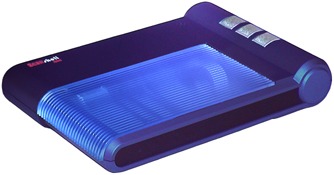
PressedButton
Section titled “PressedButton”Returns the button number that was pressed (valid only when using ScanShell 1000 scanner model) (read-only)
Reads this value after reading the property PaperInTray (that indicates that one of the three buttons of the scanner was pressed) to retrieve which button was pressed:
- TOP_BUTTON
- MIDDLE_BUTTON
- BUTTOM_ BUTTON
Syntax
PressedButton As IntegerParameters
None
Return Values
Returns the number of the pressed button:
| Value | Description |
|---|---|
| 1 | Top button |
| 3 | Middle button |
| 2 | Bottom button |
StopScan
Section titled “StopScan”Stops the current scan process
Syntax
StopScan()Parameters
None
Return Values
None
DefaultScanner
Section titled “DefaultScanner”Sets the default scanner type (loads the SDK faster) (Write-only)
Syntax
DefaultScanner As IntegerParameters
None
Return Values
Returns the DefaultScanner value
AssignScanner
Section titled “AssignScanner”Use a loop to call this function to get all the SnapShell devices and save it in a local array to call each SnapShell device later in your application
Syntax
AssignScanner(ScannerIndex As Integer)Parameters
| Parameter | Description |
|---|---|
| [in] ScannerIndex | Use -1 to get the USB port number of the next SnapShell camera |
Return Values
The USB port number to which the SnapShell device is connected
GetCurrentScannerIndex
Section titled “GetCurrentScannerIndex”Gets the active SnapShell device USB port
Syntax
GetCurrentScannerIndex()Parameters
None
Return Values
Returns the active USB port number of the current active SnapShell device
ReleaseScanner
Section titled “ReleaseScanner”Use a loop to call this function to release each SnapShell device or use the KillSnapServerfunction to release all the SnapShell devices at once.
Syntax
ReleaseScanner(ScannerIndex As Integer)Parameters
| Parameter | Description |
|---|---|
| [in] ScannerIndex | Use -1 to release all SnapShell cameras |
Return Values
None
SetCurrentScannerIndex
Section titled “SetCurrentScannerIndex”Sets the active SnapShell device to a specific USB port
Syntax
SetCurrentScannerIndex(ScannerIndex As Integer)Parameters
| Parameter | Description |
|---|---|
| [in] ScannerIndex | SnapShell device index as returned by the AssignScannerfunction |
Return Values
None
GetFirstTwainSource
Section titled “GetFirstTwainSource”Detects and gets the first TWAIN scanner that connects to your system
- If this function returns SLIB_ERR_NO_NEXT_VALUE, then no more TWAIN scanners have been detected.
- If the return value is SLIB_TRUE, then there are more TWAIN scanners found and you can call the GetNextTwainSourcefunction to get the entire TWAIN scanners list.
Syntax
GetFirstTwainSource(ScannerName As String)Parameters
| Parameter | Description |
|---|---|
| [In-out] ScannerName | Gets the first TWAIN scanner name that is found |
Return Values
| Value | Description |
|---|---|
| SLIB_TRUE | Successfully completed |
| SLIB_FALSE | Function failed to find scanner |
| SLIB_ERR_NO_NEXT_VALUE | No more TWAIN scanners found |
| SLIB_ERR_NO_TWAIN_INSTALLED | No TWAIN devices found |
GetNextTwainSource
Section titled “GetNextTwainSource”Detects and gets the next TWAIN scanner that connects to your system
- If this function returns SLIB_ERR_NO_NEXT_VALUE, then no more TWAIN scanners have been detected.
- If the return value is SLIB_TRUE, then there are more TWAIN scanners found and you can call the GetNextTwainSource function again to get the entire TWAIN scanners list.
Syntax
GetNextTwainSource(ScannerName As String)Parameters
| Parameter | Description |
|---|---|
| [In-out] ScannerName | Gets the next TWAIN scanner name that is found |
Return Values
| Value | Description |
|---|---|
| SLIB_TRUE | Successfully completed |
| SLIB_ERR_NO_NEXT_VALUE | No more TWAIN scanners found |
GetTwainScanner
Section titled “GetTwainScanner”Gets the current TWAIN scanner that is connected to your system
Syntax
GetTwainScanner(ScannerName As String)Parameters
| Parameter | Description |
|---|---|
| [In-out] ScannerName | Gets the current connected TWAIN scanner name that is found |
Return Values
| Value | Description |
|---|---|
| SLIB_TRUE | Successfully completed |
| SLIB_ERR_NO_NEXT_VALUE | No more TWAIN scanners found |
SetTwainScanner
Section titled “SetTwainScanner”Sets the current TWAIN scanner that is connected to your system
Note: Use this function before you initialize the library.
Syntax
SetTwainScanner(ScannerName As String)Parameters
| Parameter | Description |
|---|---|
| [In] ScannerName | String that contains the scanner name |
Return Values
| Value | Description |
|---|---|
| SLIB_TRUE | Successfully completed |
| SLIB_FALSE | Failed to find a scanner |
UseFixedModel
Section titled “UseFixedModel”Sets the UseFixedModel value (Write)
Note: Setting this value will set the AcuFill SDK to work only with the given scanner type.
Syntax
UseFixedModel As IntegerParameters
None
Return Values
Returns the UseFixedModel value
SetCenteredImage
Section titled “SetCenteredImage”Specifies whether to set the alignment of the captured image to be centered (Write-only*)*
Syntax
SetCenteredImage As IntegerParameters
| Parameter | Description |
|---|---|
| 1 | Center image |
| 0 | Don’t center image |
Return Values
None