

Programming guide
The AcuFill Application Programming Interface (API) enables users to scan a document, manipulate an image, and extract the data from the image. The API is a collection of 5 dynamic-link libraries (DLLs), each of which handles a different part of the process:
| Library | Description |
|---|---|
| Slib.dll | Controls the scanner operation and saves the image in a bitmap file and in memory for further use. Can also read driver’s license magnetic strip data |
| ImageCtrl.dll | Enables image manipulation |
| Socr.dll | Performs general OCR functions |
| IdCard.dll | Analyzes driver’s licenses (text) |
| BarCode.dll | Analyzes driver’s licenses (2D barcode) and general-purpose PDF417 2D barcodes |
| DynamicFieldExtraction.dll | Enables dynamic export of the analyzed data to previously defined windows |
Libraries
Section titled “Libraries”The libraries Slib.dll and ImageCtrl.dll are the core libraries of the SDK. You must have these libraries in order to scan and manipulate the document image. All other libraries are optional and are used to extract different types of data the image. For example, if you only wish to scan the image and save it as, for example, a TIFF image, than you only need to use Slib.dll and ImageCtrl.dll. However, if you wish to scan a driver’s license and extract its data, then you will also need to use the Socr.dll and IdCard.dll libraries in addition to Slib.dll and ImageCtrl.dll.
| Function | DLLs | ||||
|---|---|---|---|---|---|
| Function | Slib | ImageCtrl | Socr | IdData | BarCode |
| Driver’s license magnetic strip reading | Yes | ||||
| General document scan | Yes | Yes | |||
| General document scan and text extraction | Yes | Yes | Yes | ||
| Driver’s license scan and text fields extraction | Yes | Yes | Yes | Yes | |
| General document scan and data extraction from 2D barcode | Yes | Yes | Yes | ||
| Driver’s license scan and barcode data extraction | Yes | Yes | Yes |
Library functions
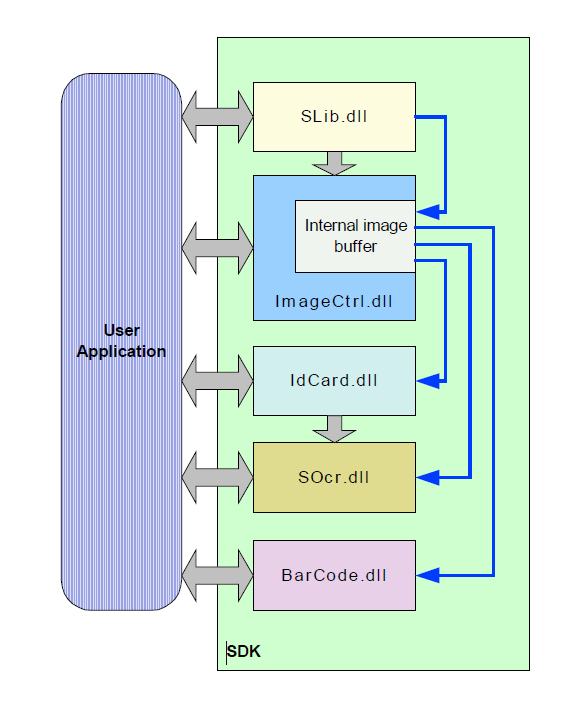
Section titled “Library functions”The ImageCtrl.dll contains a buffer to the recently scanned image. This image buffer is fielded up by Slib.dll (that also stores a copy of the image in a file on the hard drive). The image buffer is used to store the driver’s license image that can be processed by IdCard.dll. Alternatively, this buffer is also used for extracting general text (using Socr.dll) from text cards. You can also save the image buffer to the disk (using ImageCtrl.dll API) in one of seven image formats (BMP, JPEG, TIFF, PCX, PSD, TGA, PNG).
License keys
Section titled “License keys”Before using the libraries, you must initialize each library with the license key.
There are two license key types:
- **Temporary - ** Valid for one month only and issued by GBG
- **Permanent - ** Included with the product package at the time of purchase
The scanner functions as a hardware plug. Therefore, before you initialize the libraries with a permanent license key, you must verify that the scanner is connected to the PC and that its driver is installed correctly. If you are initializing the SDK libraries with a temporary license (for evaluation), then you do not need to have the scanner connected to the PC.
Distribution
Section titled “Distribution”To install the SDK files at the destination computer, you simply need to copy all the SDK files that are in the SDK installation folder to the destination computer. There are some files that will need to be registered on the destination computer such as COM/ActiveX objects. Install these files at the end of the SDK files installations since it will need the non-COM/ActiveX files to exist before registration.
The following files must be registered:
- ScanW.dll (COM object)
- ScanWEx.dll (COM object)
- ScanX.dll (ActiveX object) - mostly used for VB scripts
Note: If you do not use the COM interface in your application and use the SDK files directly like in VC++, then you do not need to install these files on the destination computer.