

Face Camera
The Face Camera component provides a live face capture experience with real-time feedback and automatic capture.
Properties
Section titled “Properties”Core Properties
Section titled “Core Properties”-
isOpen: Boolean
Starts or stops the camera. Automatically set tofalseafter capture or error — except when the preview screen (showPreviewScreen, opt-in) is enabled and the user chooses “Take another photo”, in which case the camera restarts internally andisOpenstaystrue. -
deviceId: String
Specifies the ID of the camera device to use. The component validates that the provided value matches an available video input. If invalid or omitted, the default/front-facing camera is selected. -
initializationTimeoutDuration: Number (milliseconds)
How long the component waits for initialization to finish before timing out. Default:30000(30s). If initialization is not completed within this period, a timeout error is raised and the camera fails to start. -
autoCaptureTimeoutDuration: Number (milliseconds)
How long the component waits after initialization for an automatic face capture before timing out. Default:60000(60s). When the timeout expires, an auto-capture error (code 4) is dispatched and the camera closes automatically. Set to0to disable. -
showBackButton: Boolean
Controls the visibility of the back button used to exit the camera. Default:true. -
enableOrientationLock: Boolean
Iftrue, the component attempts to lock the screen orientation to portrait on supported devices/browsers. Default:false. -
showPreviewScreen: Boolean
Controls whether the post-capture preview screen (review/retake) is shown before dispatchingcapture. Whenfalse(the default),capturedispatches immediately after a photo is taken, matching this component’s behavior prior to ZIM-971. Opt in per integration — coordinate with your team before enabling, since it changes whencapture/closefire. Default:false.
Detection Feedback
Section titled “Detection Feedback”-
hints: FaceDetectionHint
Customizes user guidance messages used by detection feedback. Any fields you omit fall back to sensible defaults. -
detectionState: FaceDetectionState (read-only)
Indicates the current detection state. Useful for custom UI logic. -
detectionText(faceState): Function
Returns the human-readable guidance message for the providedFaceDetectionState, applying yourhintsand defaults. -
isInPreview: Boolean (read-only)
Indicates whether the component is currently showing a captured image preview.
Text Customization
Section titled “Text Customization”The Face Camera component supports text customization for internationalization, branding, and accessibility. Customer feedback during the v11 → v2.0.x migration showed that listing keys without describing how each one is applied at runtime is not enough. The reference below categorizes every supported key by runtime behavior, so you can map UI copy, ARIA labels, and screen-reader-only announcements without inspecting the SDK source.
Customization Objects
Section titled “Customization Objects”The component exposes four objects, each with its own purpose:
| Object | Purpose | Status |
|---|---|---|
uiTexts |
User-facing copy and orientation-related text keys (recommended). | Current |
texts |
Alternative way to supply user-facing copy. Covers the same subset as the FaceTexts type — note this subset does not include landscapeButtonAriaLabel. |
Current (alternative) |
ariaLabels |
ARIA labels for interactive controls (backButton, forcePortraitMode). Recommended for accessibility overrides. |
Current |
accessibilityTexts |
Legacy accessibility strings, kept for backward compatibility. | Legacy |
Precedence for visible/user-facing copy:
uiTexts → texts → accessibilityTexts (legacy) → Component defaultsPrecedence for the back button ARIA label (.backButton):
ariaLabels.backButton → accessibilityTexts.backButtonAriaLabel → DefaultPrecedence for the force-portrait button ARIA label:
ariaLabels.forcePortraitMode → uiTexts.landscapeButtonAriaLabel → DefaultuiTexts.landscapeButtonAriaLabel applies only to the force-portrait button. It does not affect the back button.
Key Reference — Categorized by Runtime Behavior
Section titled “Key Reference — Categorized by Runtime Behavior”Each customization key falls into exactly one category below:
| Category | What it means at runtime |
|---|---|
| Visible UI copy | Rendered as visible text in the active flow. |
| ARIA label | Rendered as an aria-label on an interactive control. Not visible. |
| Screen-reader-only text | Rendered inside an aria-live / .sr-only region. Not visible. |
| Error event text | Used as the message field of a FailureEvent. Not rendered in the UI. |
| Unreachable / backward-compatible | Exists in the API for backward compatibility but is bound only inside a DOM region that the supported customer flow never reaches. |
uiTexts keys
Section titled “uiTexts keys”| Key | Category | Where it renders / when it applies |
|---|---|---|
faceInstruction |
Visible UI copy | Primary “place your face” guidance in the portrait flow. Recommended for that text. |
landscapeTitle |
Visible UI copy | Title of the landscape orientation overlay (mobile landscape). |
landscapeSubtitle |
Visible UI copy | Subtitle of the landscape orientation overlay. |
landscapeButtonLabel |
Visible UI copy | Visible label of the “force portrait” button. Renders only when enableOrientationLock is true and the browser/device supports screen.orientation.lock(). |
landscapeButtonAriaLabel |
ARIA label | aria-label of the “force portrait” button. Does not affect the back button. Note: this key exists only on uiTexts, not on texts (it is not part of the FaceTexts type). |
orientationErrorMessage |
Error event text | Used as the message of the FailureEvent dispatched when a capture attempt is blocked because the device is mobile + landscape (shouldBlockCapture: isMobile && isLandscape). Not rendered as overlay copy. |
deviceOrientationText |
Screen-reader-only | Inside <div aria-live="polite" class="sr-only">. Announced by screen readers (e.g. heard in TalkBack when rotating). |
landscapeOrientationText |
Screen-reader-only | Same SR-only region as above, when device is in landscape. |
portraitOrientationText |
Screen-reader-only | Same SR-only region as above, when device is in portrait. |
step1Title, step1Description |
Unreachable / backward-compatible | Bound in a sidepanel element that only becomes visible under @media (orientation: landscape) for .sidepanel.mobile. Mobile landscape capture is blocked by design (biometric quality), and the landscape orientation overlay renders above the sidepanel. The text is in the DOM but never visible in any supported customer flow. Use uiTexts.faceInstruction for the visible “place your face” guidance. |
step2Title, step2Description |
Unreachable / backward-compatible | Same as above. |
step3Title, step3Description |
Unreachable / backward-compatible | Same as above. |
ariaLabels keys
Section titled “ariaLabels keys”| Key | Category | Where it applies |
|---|---|---|
backButton |
ARIA label | aria-label of the back button. Recommended way to override it. |
forcePortraitMode |
ARIA label | aria-label of the force-portrait button. Takes precedence over uiTexts.landscapeButtonAriaLabel. |
accessibilityTexts keys (legacy)
Section titled “accessibilityTexts keys (legacy)”| Key | Category | Notes |
|---|---|---|
backButtonAriaLabel |
ARIA label (legacy) | Legacy fallback for the back button. Use ariaLabels.backButton instead in new integrations. |
placeYourFaceText |
Visible UI copy (legacy) | Legacy fallback for the “place your face” guidance. Use uiTexts.faceInstruction instead. |
capturedPhotoText |
Visible UI copy (supported) | Visible confirmation text shown on successful capture. There is no uiTexts equivalent, so accessibilityTexts.capturedPhotoText is the current supported customization path for this string. This key lives on accessibilityTexts for historical reasons; despite the object being marked “legacy”, this specific key is the supported way to override the captured-photo confirmation. |
Orientation Keys — Quick Visibility Reference
Section titled “Orientation Keys — Quick Visibility Reference”The orientation-related keys span four categories. This is the single most common source of confusion during migration:
| Key | Visible? | Notes |
|---|---|---|
landscapeTitle, landscapeSubtitle |
Visible in the landscape overlay | Mobile landscape only. |
landscapeButtonLabel |
Visible only if enableOrientationLock + lock supported |
Otherwise the button is not rendered. |
landscapeButtonAriaLabel |
Not visible | aria-label of the force-portrait button (not the back button). |
deviceOrientationText, landscapeOrientationText, portraitOrientationText |
Not visible — screen-reader announcement only | Heard in TalkBack/VoiceOver when the device rotates. |
orientationErrorMessage |
Not visible — error event message |
Surfaces in the FailureEvent.detail.error.message when capture is blocked on mobile-landscape. |
v11 → v2.0.x Migration Mapping
Section titled “v11 → v2.0.x Migration Mapping”If you are migrating from WebSDK v11, use this mapping to move existing customizations to the v2.0.x API:
| v11 / pre-migration key | v2.0.x recommended | Notes |
|---|---|---|
| Visible “place your face” guidance | uiTexts.faceInstruction |
Primary visible instruction in the portrait flow. |
| Back-button screen-reader label | ariaLabels.backButton |
accessibilityTexts.backButtonAriaLabel is still supported as legacy fallback. |
| Force-portrait button visible label | uiTexts.landscapeButtonLabel |
Renders only when enableOrientationLock is true and lock is supported. |
| Force-portrait button ARIA | ariaLabels.forcePortraitMode |
uiTexts.landscapeButtonAriaLabel is consulted next for this button. |
| Orientation overlay title/subtitle | uiTexts.landscapeTitle, uiTexts.landscapeSubtitle |
Visible in landscape overlay. |
| Orientation screen-reader announcements | uiTexts.deviceOrientationText, landscapeOrientationText, portraitOrientationText |
SR-only. |
| Mobile-landscape capture-blocked message | uiTexts.orientationErrorMessage |
Used as the FailureEvent message. |
| Captured-photo confirmation text | accessibilityTexts.capturedPhotoText |
No uiTexts equivalent. Supported via accessibilityTexts. |
step1Title–step3Description |
Not needed in the supported flow | These keys remain in the API for backward compatibility but are unreachable. Use uiTexts.faceInstruction for the visible guidance. |
Example — Full Customization
Section titled “Example — Full Customization”const liveFaceCamera = document.getElementById('live-face-camera');
// Visible UI copy and orientation-related text.liveFaceCamera.uiTexts = { faceInstruction: 'Place your face within the oval', landscapeTitle: 'Turn your phone upright', landscapeSubtitle: 'Please rotate your device to portrait to take a selfie', landscapeButtonLabel: 'Force Portrait Mode', landscapeButtonAriaLabel: 'Force portrait mode', orientationErrorMessage: 'Face authentication requires portrait mode. Please rotate your device and try again.', deviceOrientationText: 'Device orientation:', landscapeOrientationText: 'landscape', portraitOrientationText: 'portrait'};
// ARIA labels for interactive controls.liveFaceCamera.ariaLabels = { backButton: 'Go back', forcePortraitMode: 'Force portrait mode'};
// Captured-photo confirmation — no uiTexts equivalent exists.liveFaceCamera.accessibilityTexts = { capturedPhotoText: 'Photo captured successfully'};Text Precedence Example
Section titled “Text Precedence Example”liveFaceCamera.uiTexts = { faceInstruction: 'Center your face' };liveFaceCamera.texts = { faceInstruction: 'Look straight ahead' };
// Rendered: "Center your face" — uiTexts wins over texts.Preview Screen Customization
Section titled “Preview Screen Customization”previewScreenTexts and previewScreenAriaLabels are independent of the objects above — they only
customize the post-capture preview screen controlled by showPreviewScreen, not the live-capture flow.
-
previewScreenTexts: Object
Overrides the post-capture preview screen (shown after a selfie is taken, before the result is returned). Recognized keys:titlebodyphotoAltTextcontinueButtonTextretakeButtonText
-
previewScreenAriaLabels: Object
Supplies ARIA labels for the preview screen’s buttons, independent ofpreviewScreenTexts. Recognized keys:continueButtonretakeButton
liveFaceCamera.previewScreenTexts = {  title: 'Check the preview of your selfie',  body: 'Check the photo of your selfie is clear, in focus and directly face on.',  photoAltText: 'Preview of your captured selfie',  continueButtonText: 'Continue',  retakeButtonText: 'Take another photo'};
liveFaceCamera.previewScreenAriaLabels = {  continueButton: 'Continue',  retakeButton: 'Take another photo'};
Lifecycle Overview
Section titled “Lifecycle Overview”The Face Camera component follows a well-defined lifecycle from initialization through capture to closure. Understanding this flow helps you implement proper event handling and state management.
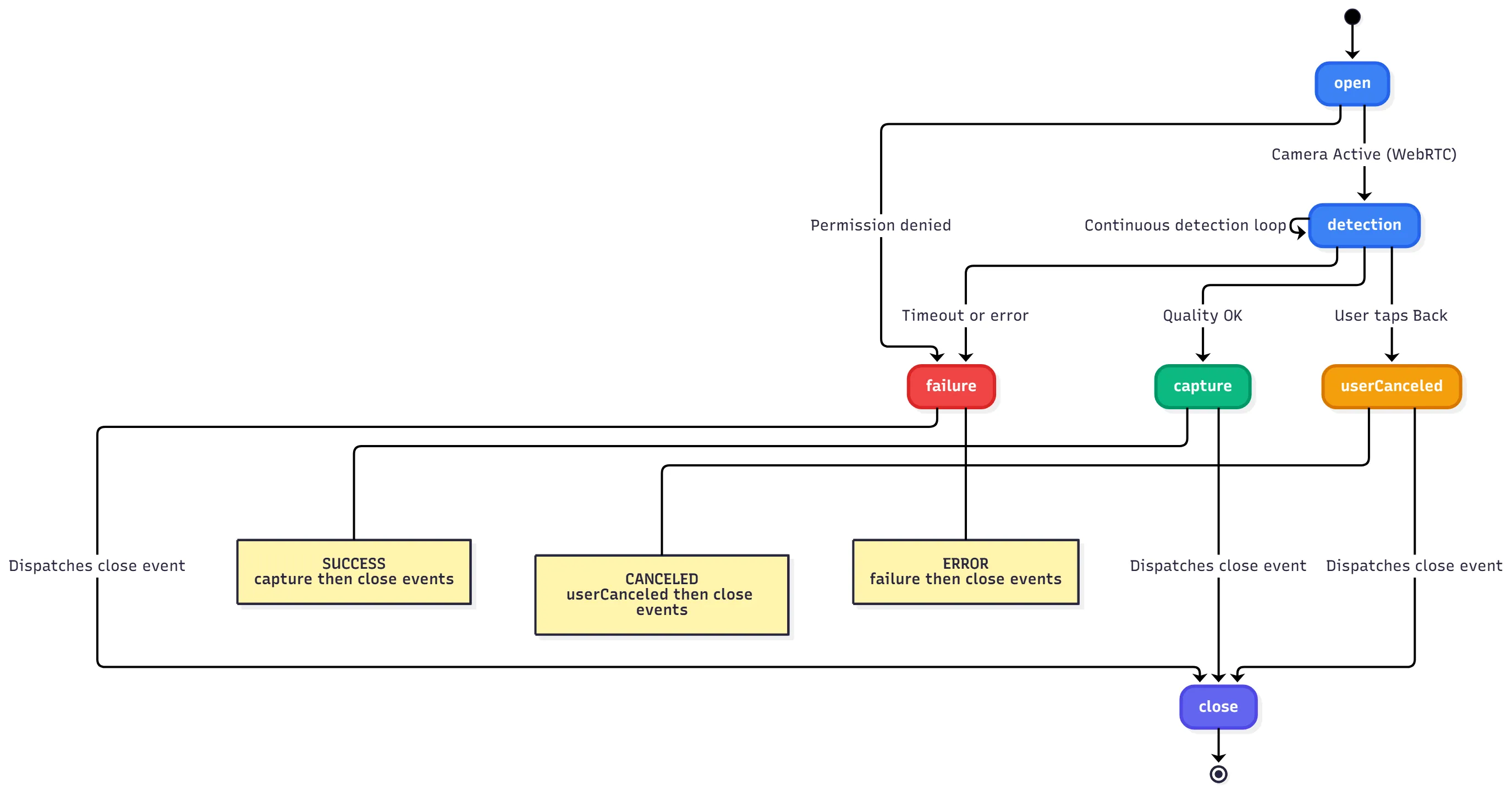
Key Lifecycle Stages:
- beforeInitialize: Preparation phase before SDK loads
- initialize: SDK models loaded and ready
- beforeOpen: Camera access requested
- open: Camera feed active (WebRTC established)
- detection: Continuous face detection loop with real-time feedback
- beforeCapture: Face validation passed, capture initiated
- capture: Image captured and encrypted
- preview (optional, opt-in): The user reviews the captured selfie, with the option to Continue or Take another photo. Only happens when
showPreviewScreenis set totrue— see the Core Properties section. - close: Camera released and resources cleaned up (always emitted)
Events
Section titled “Events”-
BeforeInitializeEventName
Dispatched before initialization begins (no models loaded yet). Useful to prepare UI state or start timers. -
InitializeEventName
Dispatched when the component is initialized and ready. -
BeforeOpenEventName
Dispatched when the camera begins to open. -
OpenEventName
Dispatched when the camera is fully open. -
DetectEventName
Dispatched on each detection.detail.errorscontains an array of detection issues (if any). -
BeforeCaptureEventName
Dispatched when the capture process begins. -
CaptureEventName
Dispatched on successful capture.detailincludes:imageBase64: Base64-encoded image string.encryptedFile: Encrypted Blob for verification.
-
CloseEventName
Dispatched when the camera closes. This event is always emitted, regardless of how the camera session ends (successful capture, user cancellation, error, or timeout). After a successful capture, thecaptureevent is dispatched first, followed by thecloseevent. When the preview screen is enabled (showPreviewScreen: true, opt-in),closeadditionally waits for the user’s Continue decision — choosing “Take another photo” instead restarts the capture session internally without ever dispatchingcaptureorclose. -
UserCanceledEventName
Dispatched when the user taps the back arrow to exit the camera without capturing an image. Thecloseevent is dispatched after this event. -
FailureEventName
Dispatched on error.detail.erroris of typeFaceCameraError. Thecloseevent is dispatched after this event.
Error Codes
Section titled “Error Codes”FaceCameraError.code identifies what failed. Branch on the code, and surface message when
you need the underlying cause.
| Code | Meaning | Typical cause |
|---|---|---|
1 |
Camera permission was denied. | The user declined the camera prompt, or the page is not in a secure context. |
2 |
An unexpected failure was reported. message retains the underlying provider text after an SDK-added prefix. |
Anything the capture provider reports that is not a permission denial — a licensing failure, a busy camera, or a device that cannot run face detection (for example a browser whose WebGL stack rejects the detector’s shaders). |
3 |
Face detection did not start before initializationTimeoutDuration elapsed. |
The detector never became ready. This is not a permissions problem — the camera prompt has already been answered by this point. |
4 |
Auto-capture did not complete before autoCaptureTimeoutDuration elapsed. |
No acceptable frame was captured in time. |
Message Format
Section titled “Message Format”message is not the raw underlying text. Every code except 1 prepends a fixed prefix, so match on
code rather than parsing message, and strip the prefix if you surface the text to end users.
| Code | message format |
|---|---|
1 |
the underlying text, with no prefix |
2 |
Unexpected error: + the underlying text |
3 |
Timeout error: + the reason |
4 |
Auto-capture timeout: + the reason |
Do not treat code 2 as a permission problem. Only code 1 indicates that camera access was
refused; prompting the user to grant permissions in response to any other code sends them to a
setting that is already correct.
Code 1 is best-effort when the denial comes from inside the capture provider: the provider reports
every failure through a single channel that carries only a message string, so the classification
matches the wording browsers use for a denied getUserMedia call. If your integration needs
certainty, call navigator.mediaDevices.getUserMedia yourself before setting isOpen, and handle
the rejection directly — the demo app takes this approach.
Type Definitions
Section titled “Type Definitions”type FaceDetectionHint = { notInitializedHint?: string; initializingHint?: string; faceNotFoundHint?: string; tooManyFacesHint?: string; faceAngleTooLargeHint?: string; probabilityTooSmallHint?: string; faceTooSmallHint?: string; faceCloseToBorderHint?: string;};
enum FaceDetectionState { NotInitialized = 'NOT_INITIALIZED', FaceNotFound = 'FACE_NOT_FOUND', TooManyFaces = 'TOO_MANY_FACES', FaceAngleTooLarge = 'FACE_ANGLE_TOO_LARGE', ProbabilityTooSmall = 'PROBABILITY_TOO_SMALL', FaceTooSmall = 'FACE_TOO_SMALL', FaceCloseToBorder = 'FACE_CLOSE_TO_BORDER',}
type FaceCameraError = { code: number; message: string;};